Turn any Spotify playlist into a Beatport cart
Entire playlists. One click.
Two hours of Beatport and Bandcamp tabs before every gig, and you still can't remember what you already bought. Muvic takes the playlist, fills your cart on the store you pick, checks the other one for anything the first doesn't carry, and keeps every purchase in one library you own.
Muvic finds every track on Beatport or Bandcamp and fills your cart, so a gig's worth of shopping is one click instead of an evening of tabs.
Muvic never buys anything for you. You review every cart before you pay. How that works
macOS 12+, no Windows or Linux build yet · Free plan with 25 tracks a month · Intel Mac build · Already have an account?
Muvic never buys anything on its own
The question under any tool that spends time in your cart is what happens when it gets a match wrong. Muvic fills the cart and stops.
You check out, not Muvic
Matches land in your Beatport cart or Bandcamp wishlist and stop there. Muvic never completes a purchase and never handles your card.
A wrong mix costs a click
Turn on Prefer Extended Mix and Muvic reaches for the extended version. Either way every match is sitting in front of you before you pay, so a bad guess is a cart-remove, not a refund.
Misses are flagged, never substituted
Anything Muvic is not confident about is left out and reported. On Pro it can retry the other platform or save the misses to a playlist to come back to.
More on how matching works in the accuracy questions.
How it works
Three steps to owning your music
Bring your playlists
Import a Spotify playlist, paste a list of tracks, or drop a .m3u, .m3u8, or .csv from rekordbox, Serato, or Music.app.
Pick the tracks
Choose every track or just a few. Muvic shows duplicate detection against your iTunes library and prior syncs so you don't buy what you already own.
Sync to Beatport or Bandcamp
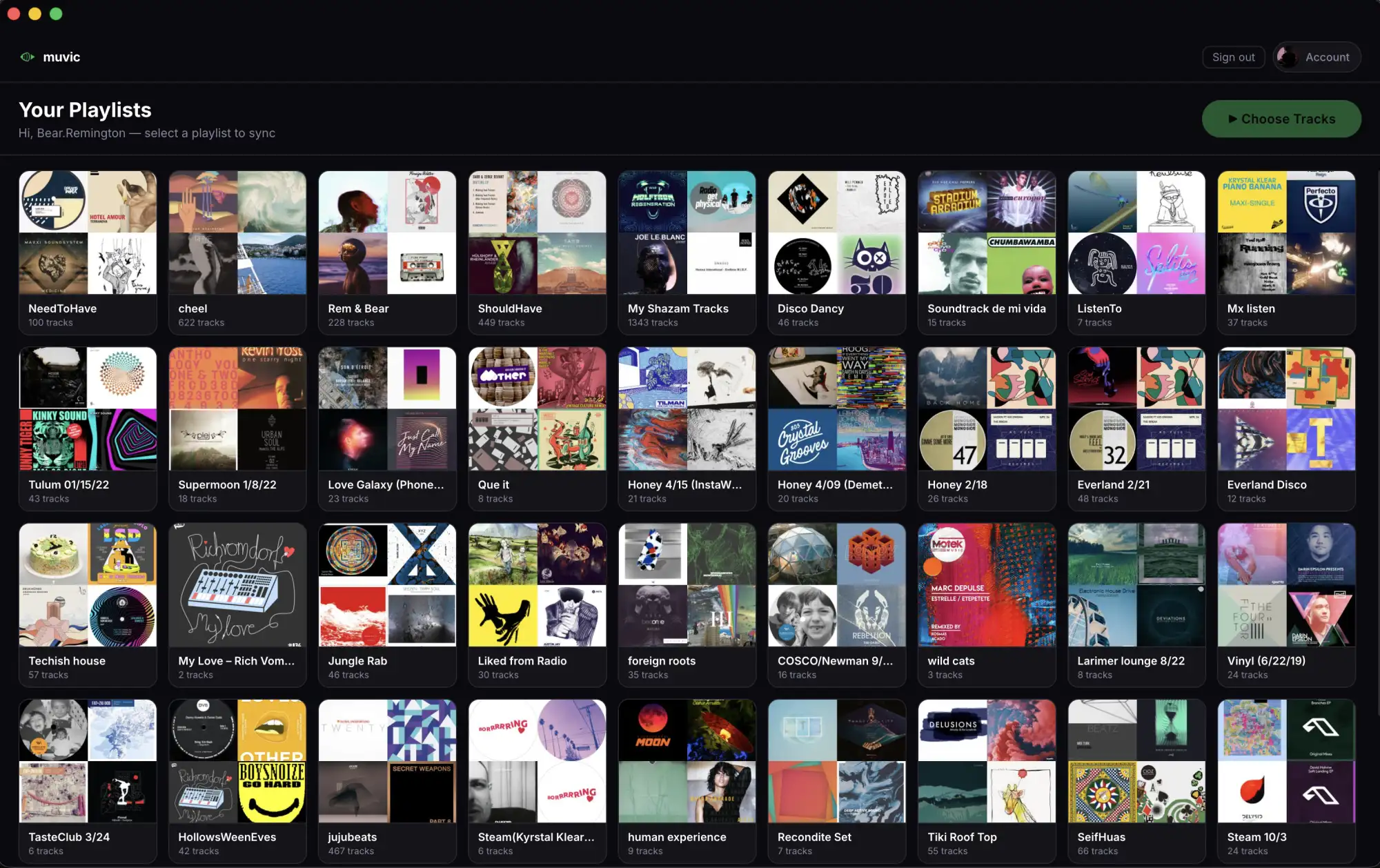
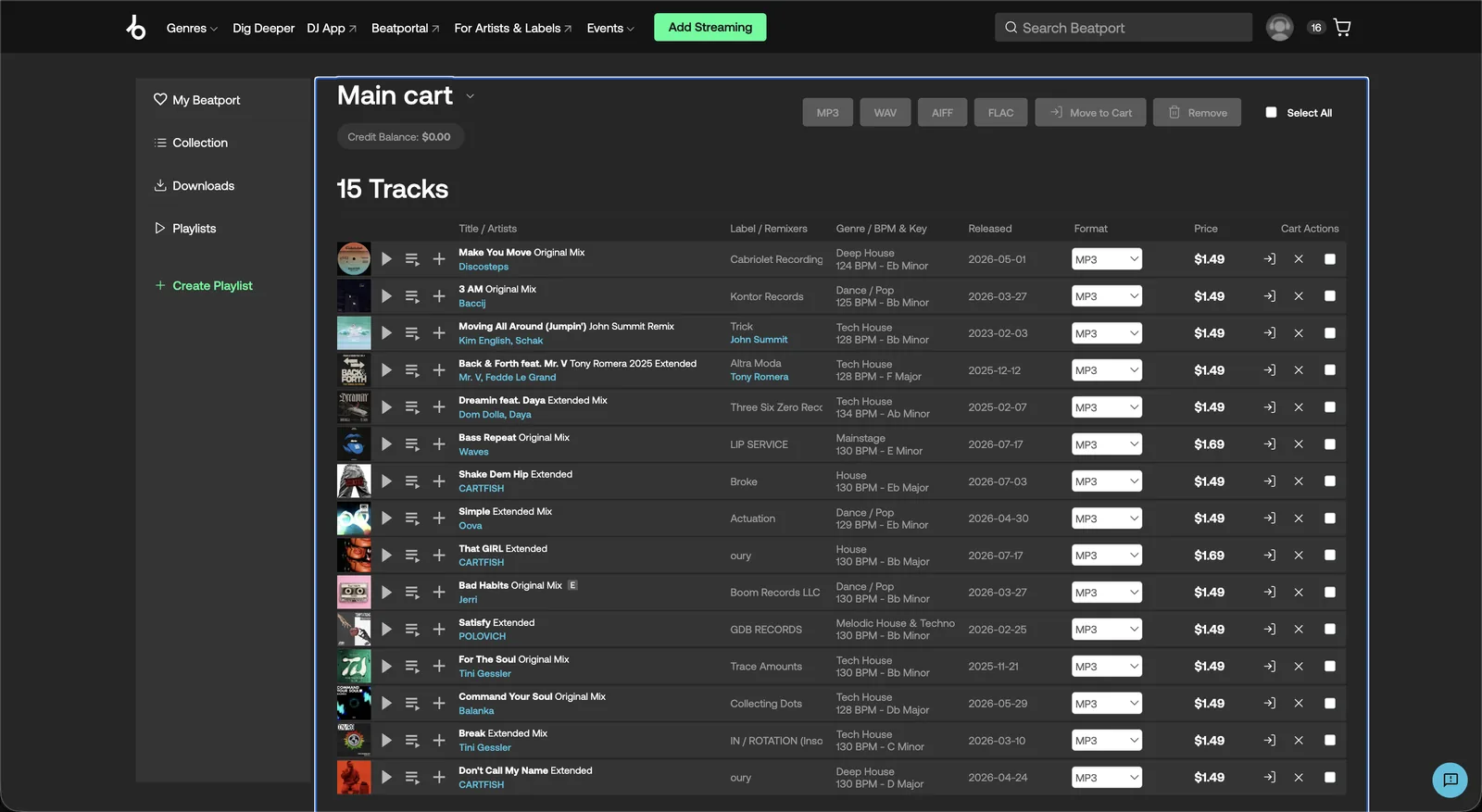
Muvic searches and adds each track to your cart automatically. You review and pay on the platform.
When one store doesn't have it
Self-released edits and live sets often live on Bandcamp, not Beatport. With Pro, a miss on one store is retried on the other instead of dropped.
Demos
Watch it work
Import a playlist, pick your tracks, and Muvic fills your Beatport cart while you walk away.
Why Muvic
Built for DJs who take ownership seriously
Know what you own and what you spent
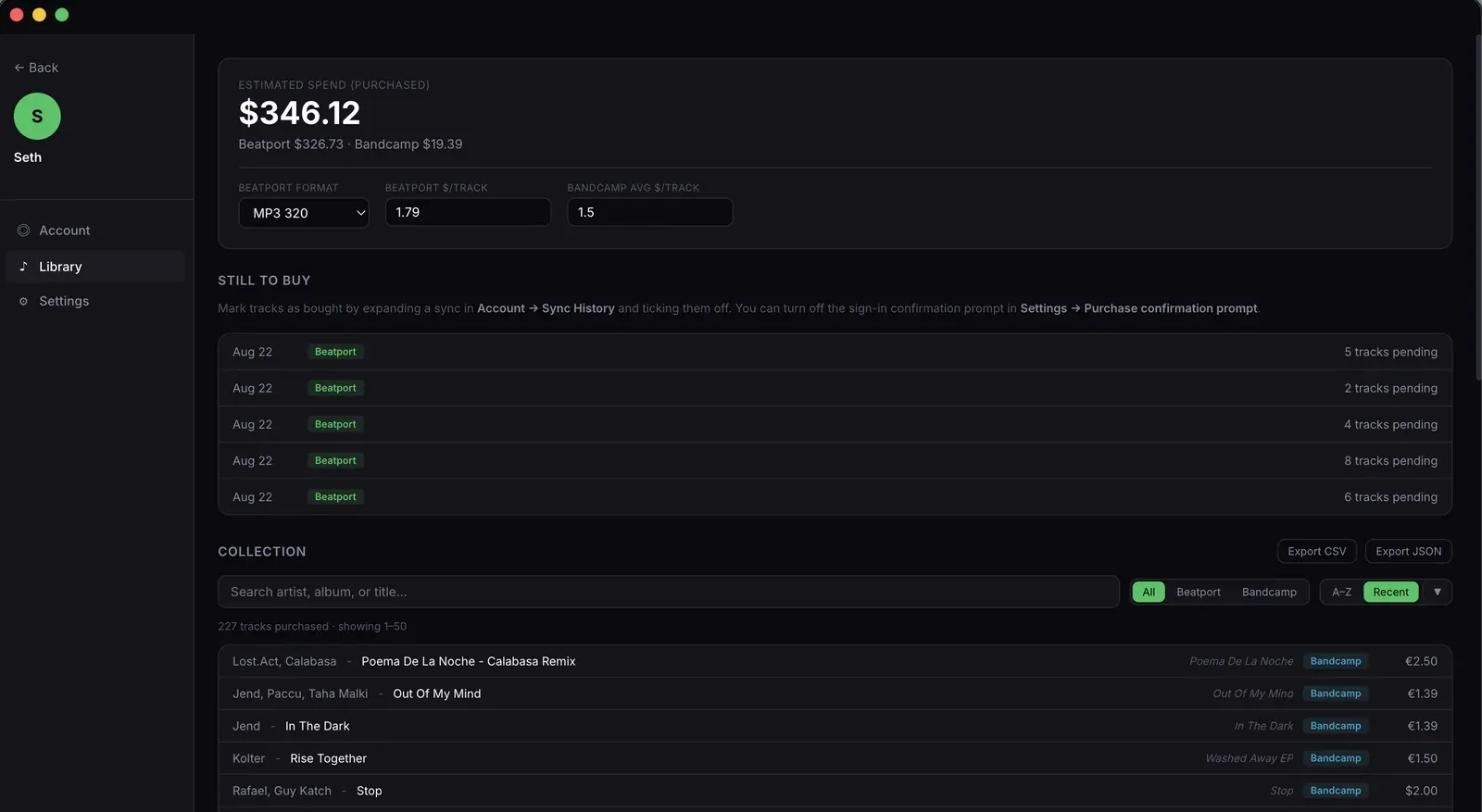
Beatport and Bandcamp purchases in one searchable library, with per-platform spend totals and your still-to-buy list. Export to CSV or JSON whenever you want your data somewhere else.
Support artists on Bandcamp
Bandcamp pays artists more than any other platform. Make it your store and Muvic fills your Bandcamp wishlist first, checking Beatport only for what Bandcamp does not carry.
Own your music
Downloads live on your hard drive. No subscription, no streaming, just play anywhere, offline, forever.
We never store your platform passwords
The desktop app encrypts Beatport and Bandcamp credentials in your OS keychain and uses them only for actions you initiate. The browser extension never touches them. It just reads your existing signed-in tabs.
Be the DJ who has the record
The edit you found before it charted, playable in a basement with no signal, and yours to send to a promoter after the set instead of shrugging at a screenshot. When someone asks what that last record was, you own the answer.
Muvic exists so your prep time goes to creative decisions, not to clicking through browser tabs. Paste the playlist, review the cart, and walk into every gig knowing your crate is ready.
A crate you bought is yours. It does not vanish when a licence lapses or a playlist gets pulled, and every track you buy on Bandcamp or Beatport puts money in the hands of the artists you actually play.
Muvic is for DJs who buy their music. If you play streaming-only crates, or you are on Windows or Linux, this is not the tool for you yet.
Where to use Muvic
Sync from Mac or from any browser
Both surfaces can sync to Beatport and Bandcamp. The Mac app integrates with macOS for Music.app duplicate detection, drag-drop, and native notifications. The web app works from any browser with the Muvic Sync Helper extension. Pick whichever fits your workflow.
Muvic for Mac
macOS 12+ · Free download
- 🔄Full sync workflow on macOSDrop in a .m3u or .csv, or paste a list. The Mac app searches and fills your Beatport and Bandcamp carts.
- 🪞iTunes / Music.app duplicate detectionMuvic reads your local Music.app library and skips tracks you already own, so you don't double-buy. Mac-only.
- 🔔Native notifications and drag-dropSync-complete notifications, and drag .m3u, .m3u8 or .csv playlist files straight in from Finder.
- ⚡Touch ID and offline libraryBiometric sign-in. Library, history, and duplicate detection read from a local SQLite database for a fast, offline-capable browse.
- 🔒macOS Keychain for credentialsYour Beatport and Bandcamp credentials live in the macOS Keychain on your Mac, and are encrypted in transit when the sync service signs in on your behalf.
Muvic on the web
Any browser, any device
- 🔄Sync from any browserInstall the Muvic Sync Helper extension once. Paste your tracks at muvic.app/sync and the sync service fills your Beatport and Bandcamp carts using your signed-in browser session.
- 📚Browse your library anywhereYour full collection of Beatport and Bandcamp tracks, with artist, album, sync date, and price, readable from any browser.
- 💸Spend totals across platformsPer-platform spend, monthly totals, and a confirmed-purchase count, derived server-side from your sync history.
- ⚙️Manage your accountChange display name and password, view subscription tier, jump out to Lemon Squeezy for billing, delete account.
Save hours every week
From hours of clicking to one click
50 tracks. By hand, that's 2 to 3 hours of clicking, switching tabs, and re-typing artist names. With Muvic it's one click. Start the sync, walk away, and come back to a filled cart.
By hand
~2 to 3 hours- Open Beatport in one tab.
- Search "Artist - Title" for the first track.
- Click Add to Cart.
- Repeat for tracks 2 through 50.
- For each track Beatport doesn't have, switch to Bandcamp and repeat the search.
- Hope you didn't already buy half of them last month.
With Muvic
One click, hands-off- Drop a .m3u, paste tracks, or import a Spotify playlist.
- Click Sync.
- Review the cart Muvic filled, every match with the right mix variant, every miss flagged.
- Check out on Beatport and Bandcamp.
- Duplicates from your iTunes library and prior syncs are skipped automatically.
Weighing Muvic against something specific? See how it compares with Choon, Lexicon DJ, TrackDen, buying by hand, Tune My Music, or Merch Table.
Still building your music library by hand?
Entire playlists. One click.
Own the music you love
Free on Mac · muvic.app
Pricing
Simple, honest pricing
Start free. Upgrade when you need more.
$6.99 a month is less than two tracks on Beatport, and it saves you hours of clicking every gig prep.
- ✓25 tracks per month
- ✓Beatport sync
- ✓Last 5 syncs in history
- ✓Unlimited Beatport + Bandcamp syncs
- ✓Platform fallback that tries the other store when a track is missing
- ✓Library with collection, spend tracking, still-to-buy, and CSV / JSON export
- ✓Duplicate detection that skips tracks already synced or already in your iTunes library
- ✓Full sync history with per-track purchase confirmation
- ✓Cancel any time

- ✓Everything in Pro Monthly
- ✓Unlimited Beatport + Bandcamp syncs
- ✓Platform fallback that tries the other store when a track is missing
- ✓Library with collection, spend tracking, still-to-buy, and CSV / JSON export
- ✓Duplicate detection that skips tracks already synced or already in your iTunes library
- ✓Full sync history with per-track purchase confirmation
| Compare plans | Free | Pro Monthly | Pro Yearly |
|---|---|---|---|
| Tracks per month | 25 | Unlimited | Unlimited |
| Beatport sync | ✓ | ✓ | ✓ |
| Bandcamp sync | – | ✓ | ✓ |
| Platform fallback on misses | – | ✓ | ✓ |
| Library with spend tracking | – | ✓ | ✓ |
| CSV / JSON export | – | ✓ | ✓ |
| Duplicate detection | – | ✓ | ✓ |
| Sync history | Last 5 | Full | Full |
| Save unfound tracks to a Muvic playlist | ✓ | ✓ | ✓ |
| Money-back guarantee | – | 7 days | 14 days |
FAQ
Common questions
Do I need a Spotify account?
.m3u, .m3u8, or .csv files (rekordbox, Serato, Music.app, and Engine DJ all export these). Connecting a Spotify account is optional and just saves you the copy step.Where do my playlists end up?
What if Muvic can't find a track?
How does Muvic pick the right mix or remix?
How does the Library work?
Will using Muvic get my Beatport or Bandcamp account banned?
Is my data private?
- Beatport and Bandcamp credentials are encrypted at rest in your macOS Keychain and are never stored on our servers. When you start a sync, they travel encrypted in transit so the sync service can sign in on your behalf, and they're used only for actions you initiate.
- Spotify connects through Spotify's official OAuth flow, so Muvic never sees your Spotify password.
- Your Muvic account password is bcrypt-hashed and stored on our server (so you can sign in from the web too). We never see the plaintext.
- Sync history (tracks, prices, dates) is stored server-side under your account so the Library page can render on any device. A local copy is mirrored to your Mac for offline browsing.
- We don't sell data. The website uses HeyCatch analytics to measure how the site is used; the desktop app sends only the small set of first-party events listed in the privacy policy.
Can I cancel anytime?
Ready to own your music?
Free to download. No credit card required.
Download for Mac, FreemacOS 12 Monterey or later